This chapter covers the development of a simple application which syndicates content from an RSS feed.
The walkthrough builds on the Hello World! chapter - it assumes you are familiar with the SML development workflow.
After completing this chapter you'll be able to use feature blocks to bring in dynamic content from feeds, leverage the {% for %} tag for iterating through content and the {% paginate %} helper block to add drop-in pagination.
The Daily Deals Feed
Daily Deals is an example of using RSS to pull in deals from an external site. The feed we'll be using is:
http://s1.dlnws.com/dealnews/rss/todays-edition.xml
This is a RSS 2.0 feed from DealNews.com of the most recent deals on their site. Let's get started!
Adding the RSS Feature Block
We'll be using the rss_feed feature block to bring in our RSS feed. Feature blocks are like tags but with a few key differences. Firstly, they have explicit end tags. They also have their own configuration that is managed separately - for example, the rss_feed feature has a setting for the feed's URL. They generally map 1-1 to an underlying Involver application - in the case of rss_feed, the functionality is based on the Involver RSS application.
- In your SML application, paste in the following code:
{% rss_feed %}
{% endrss_feed %}
- Click "Save Changes".
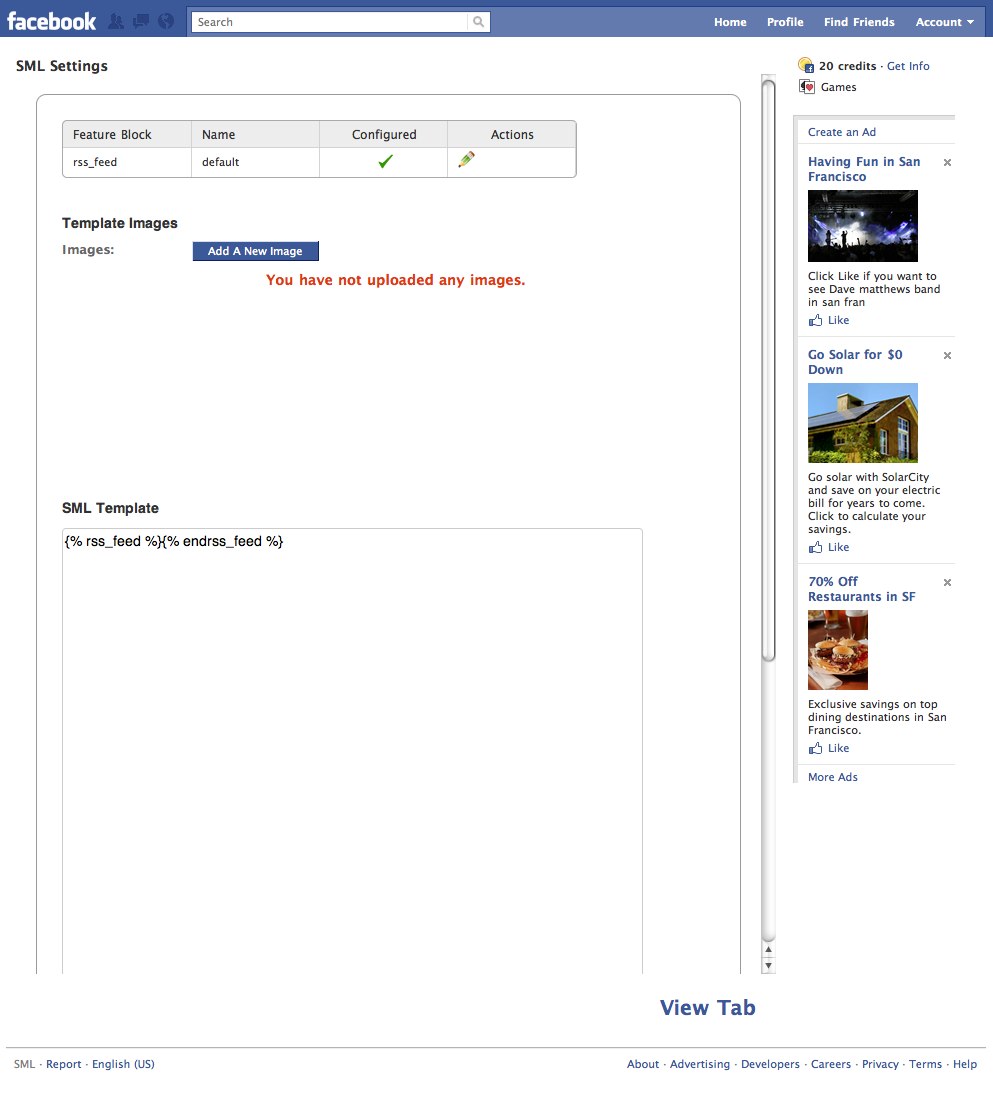
- You should now see a new row in the Features table at the top of the settings page.
Your settings page make look slightly different than the one shown below

- Click "Configure" under Actions in the new table row.
- Under News Feed Settings enter the feed URL.

- Click "Add".
- Click "Save Settings".
- Your rss_feed should now show as configured in the Feature Block table.
- At this point we can start to specify how we want the deals displayed in our application. To do that we'll need to introduce ourselves to two new concepts - context variables and the {% for %} tag. Go back to the Settings page and change your code to now read:
{% rss_feed %}
    <h2>Latest deals from <a href="{{ rss_feed.url }}">DealNews.com Daily Feed</a></h2>

    <hr>

    {% for feed_item in rss_feed.feed_items %}
        <div>
            <h3><a href="{{ feed_item.origin_url }}">{{ feed_item.title }}</a></h3>
            <p>{{ feed_item.summary_text_body | strip_html | truncate: 140 }}</p>
        </div>
    {% endfor %}
{% endrss_feed %}
- Click "Save Changes" then "Return to Facebook Page" to see your changes. If all goes well, you should see a similar list of deals as the ones below.
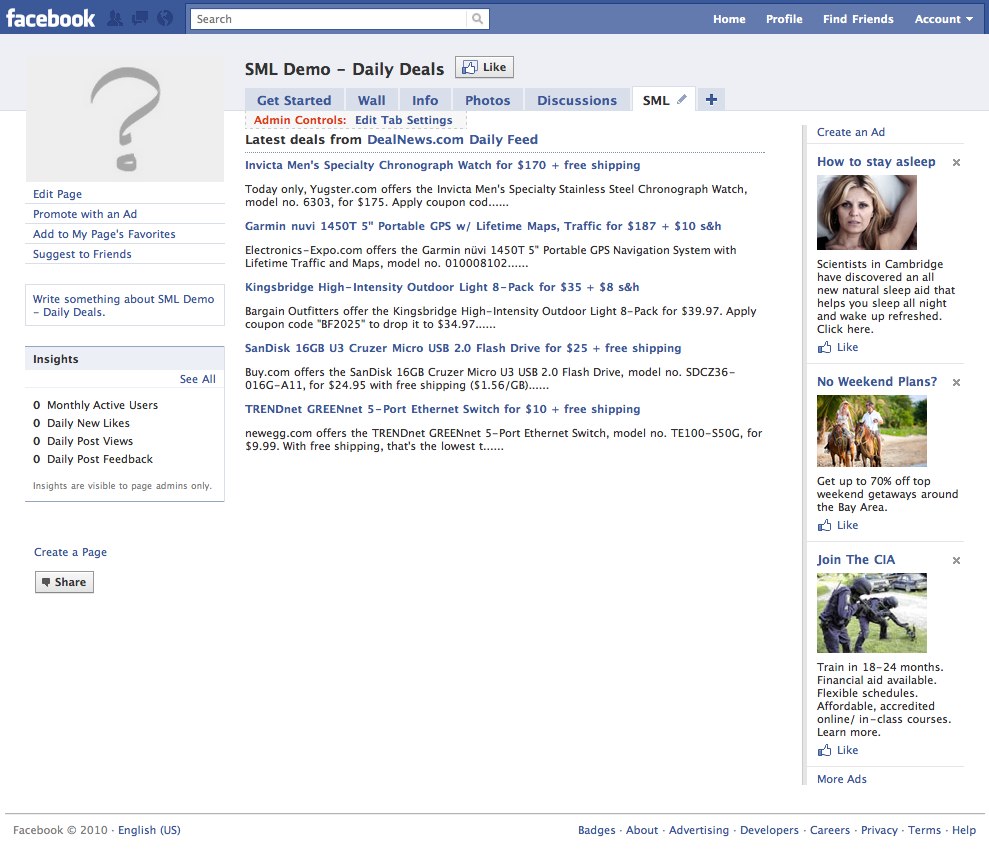
- With only ten lines of SML we now have the latest deals from DealNews.com pulled into our application. We introduced a lot of new code so lets take a minute to break it down...
Feature Block Names
Looking at the Features table, you'll notice that the name of our rss_feed feature block is "default". A feature block's name is used to uniquely identify itself. Having a unique name is important because if we had multiple feeds in our template we would need some way to differentiate them. If a name is not provided it will default to "default". You can specify an explicit name by passing a name attribute to the tag like so:
{% rss_feed name: "daily deals" %}
The Feature Block Context
You should also notice that we added a lot of code in between the start and end tags of the rss_feed feature block. Code between feature block tags is commonly referred to as the block's context. Every feature block has a special context variable available within the scope of it's start and end tags. This special context variable always has the same name as the name of the feature block – in the case of rss_feed the name of the context variable is rss_feed. This context variable enables access to the feature's configuration as well as content. For example, we linked back to the original feed URL we configured earlier by accessing the rss_feed.url attribute.
Displaying Feed Content
The rss_feed.feed_items attribute gives us access to the feed's content. We can combine this with the {% for %} tag to iterate through the feature's content. This enables us to control the look & feel of each deal displayed from the feed.
Within the start and end tags of the for block, we can reference the current feed item in the iteration – in this case, feed_item. For each feed item, we show the deal title and link back to the deal using the title and origin_url attributes, respectively. We also show some details about each deal by using the summary_text_body attribute. We then use the strip_html & truncate filters to show up to 140 characters of stripped HTML content from each post.
Adding pagination
It would be nice if we could show just a few deals at a time and allow users to see more if they wish. This is called pagination and it's a common concern in dynamic content applications. It's often re-invented from application-to-application but in SML applications it's drop-in functionality.
- Change your code to the following:
{% rss_feed %}
    <h2>Latest deals from <a href="{{ rss_feed.url }}">DealNews.com Daily Feed</a></h2>

    <hr>

    {% paginate rss_feed.feed_items per_page: 1 page_links: false %}
        {% for feed_item in feed_items %}
            <div>
                <h3><a href="{{ feed_item.origin_url }}">{{ feed_item.title }}</a></h3>
                <p>{{ feed_item.summary_text_body | strip_html | truncate: 140 }}</p>
            </div>
        {% endfor %}

        {{ pagination_links }}
    {% endpaginate %}
{% endrss_feed %}
- Click "Save Changes" and "Return to Facebook Page" to see your changes.
- You should now see one deal with the ability to page through more.
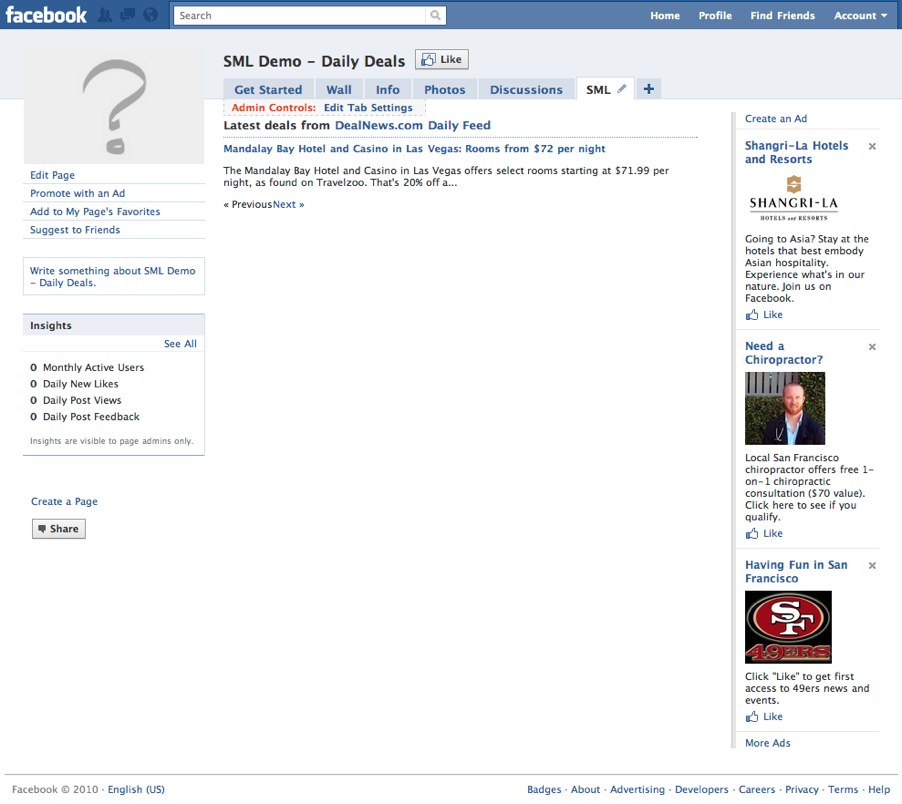
- With just a few lines of markup we've added pagination to our dynamic feed. We've also freed up real estate on the tab for more functionality. Let's break down the pagination code...
By surrounding our {% for %} loop with the {% paginate %} block helper, we've specified we want our feed items paginated. The paginate helper block takes many options such as the number of items to show per page and whether or not to show individual page links. Here we've configured the pagination to be 1 item per page and not to show page links.
A quick word on SML Helper Blocks
{% paginate %} is an example of a helper block. Helper blocks help automate common application functionality such as pagination. SML has a growing library of helper blocks like paginate which allow you to rapidly develop advanced functionality in your applications.
Next Steps
You've now built an application that pulls in dynamic content using a feature block, used the {% for %} tag to display the content and added pagination with the {% paginate %} helper block. Below is a link to the {% rss_feed %} feature block, {% for %} loop and {% paginate %} references. Read through the documentation and experiment with the different arguments and attributes available for these constructs.
On to Chapter 3
 20100916-mfdu2es3wffxbq5hgwu5xn796a.jpg (image/jpeg)
20100916-td4f5jgpkeimdjus8f8rdxg3wy.jpg (image/jpeg)
20100916-819cetahjqrri7s6a2k5tib8gu.jpg (image/jpeg)
20100916-gp6bc3eu445j3hxx67fxbfq6ik.jpg (image/jpeg)
20100917-epqci9q7tsb1dup5h1jrmm899w.jpg (image/jpeg)
20100916-mfdu2es3wffxbq5hgwu5xn796a.jpg (image/jpeg)
20100916-td4f5jgpkeimdjus8f8rdxg3wy.jpg (image/jpeg)
20100916-819cetahjqrri7s6a2k5tib8gu.jpg (image/jpeg)
20100916-gp6bc3eu445j3hxx67fxbfq6ik.jpg (image/jpeg)
20100917-epqci9q7tsb1dup5h1jrmm899w.jpg (image/jpeg)
